Below items are needed for selenium
Java JDK
http://www.oracle.com/technetwork/java/javase/downloads/jdk8-downloads-2133151.html
Eclipse - Oxygen or above Eclipse IDE for Java EE Developers
https://www.eclipse.org/downloads/
TestNG
Eclipse >> Help >> Eclipse Marketplace >> Search TestNG >> Install TestNG for Eclipse
Maven 3.5
Eclipse >> Help >> Eclipse Marketplace >> Search Maven >> Install Maven Integration for Eclipse
Maven 3.5
Jenkins 2.4
https://updates.jenkins-ci.org/latest/jenkins.war
Tomcat 9
https://tomcat.apache.org/
GitHub
Browser: Chrome or FireFox or IE
If Maven is not being used then you need below JAR files also
https://selenium-release.storage.googleapis.com/3.4/selenium-server-standalone-3.4.0.jar
http://selenium-release.storage.googleapis.com/3.4/IEDriverServer_Win32_3.4.0.zip
http://selenium-release.storage.googleapis.com/3.4/selenium-java-3.4.0.zip
http://chromedriver.storage.googleapis.com/2.29/chromedriver_win32.zip
http://mirror.fibergrid.in/apache/poi/release/bin/poi-bin-3.16-20170419.zip
Set SYSTEM Environment variables :
1) Install java jdk and jre latest : https://www.java.com/en/download/ie_manual.jsp
Java JDK
http://www.oracle.com/technetwork/java/javase/downloads/jdk8-downloads-2133151.html
Eclipse - Oxygen or above Eclipse IDE for Java EE Developers
https://www.eclipse.org/downloads/
TestNG
Eclipse >> Help >> Eclipse Marketplace >> Search TestNG >> Install TestNG for Eclipse
Maven 3.5
Eclipse >> Help >> Eclipse Marketplace >> Search Maven >> Install Maven Integration for Eclipse
Maven 3.5
Jenkins 2.4
https://updates.jenkins-ci.org/latest/jenkins.war
Tomcat 9
https://tomcat.apache.org/
GitHub
Browser: Chrome or FireFox or IE
If Maven is not being used then you need below JAR files also
https://selenium-release.storage.googleapis.com/3.4/selenium-server-standalone-3.4.0.jar
http://selenium-release.storage.googleapis.com/3.4/IEDriverServer_Win32_3.4.0.zip
http://selenium-release.storage.googleapis.com/3.4/selenium-java-3.4.0.zip
http://chromedriver.storage.googleapis.com/2.29/chromedriver_win32.zip
http://mirror.fibergrid.in/apache/poi/release/bin/poi-bin-3.16-20170419.zip
Set SYSTEM Environment variables :
1) Install java jdk and jre latest : https://www.java.com/en/download/ie_manual.jsp
JDK --> Java compiler + JRE( JVM + Library files)
JAVA_HOME = C:\Program Files\Java\jdk1.8.0_251
details are given below
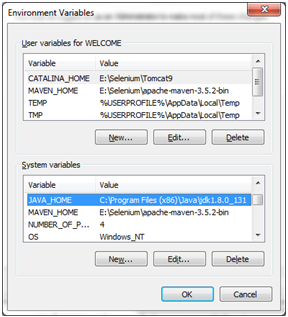


Eclipse Configuration:

Ready made items :
Hybrid Framework based on Page Object Model
pom.xml
Grid -
Extent reports -
Setup Jenkins:
Setup Tomcat:
Setup GitHub:
Setup Cucumber :
Chrome Browser plug-ins
JAVA_HOME = C:\Program Files\Java\jdk1.8.0_251
PATH = C:\Program Files\Java\jdk1.8.0_251\bin
OR
PATH = %JAVA_HOME % \bin
Maven Path :
PATH = D:\Selenium\apache-maven-3.6.3\bin ;
details are given below
JAVA_HOME= C:\Program
Files (x86)\Java\jdk1.8.0_131\; [ don't include bin
folder in java_home ]
Path = C:\Program
Files (x86)\Java\jdk1.8.0_131\bin; C:\Program Files (x86)\Java\jre1.8.0_171\bin;
[ up to bin folder in path]


on command
prompt run C:\Windows\System32>java
-version to check if java is
configured properly or not

CLASSPATH =
C:\Program Files\Java\jdk-10.0.2\bin; C:\Program Files\Java\jre-10.0.2\bin
Command to test
CLASSPATH >> C:\Windows\System32>
echo
%CLASSPATH%

JRE_HOME
= C:\Program Files\Java\jre-10.0.2;
C:\Program Files\Java\jre-10.0.2\bin;

Eclipse Configuration:
Add
jre files : Right click on project - >BuildPath - >Configure BuildPath
- >Libraries tab - > Add library --> Double click on JRE SYSTEM
LIBRARY - >Then select alternate JRE

Add below Jar files:
Selenium Standalone Server
Selenium Client-Java
Apache POI
Hybrid Framework based on Page Object Model
pom.xml
Grid -
Extent reports -
Setup Jenkins:
Setup Tomcat:
Setup GitHub:
Setup Cucumber :
Chrome Browser plug-ins
Selenium IDE : by seleniumgq.org
Katalon Recorder : by Get Free Automation Tools At katalon.com
Others
Cucumber - cucumber is a tool based on Behavior Driven Development (BDD) framework which is used to write acceptance tests for the web application.
TUTORIALS :
https://www.tutorialspoint.com/apache_poi/index.htm
https://www.tutorialspoint.com/xpath/index.htm
How to create exe file of selenium project
http://doc.alertsite.com/synthetic/monitors/selenium/create-runnable-jar-from-selenium-script-using-eclipse.htm
Selenium locaters https : //www.tutorialspoint.com/selenium/selenium_locators.htm
xpath http : //zvon.org/xxl/XPathTutorial/Output/examples.html
Videos :
Hybrid Framework based on Page Object Model :
Download Framework Code :
https://github.com/naveenanimation20/PageObjectModel
Features of this Framework :
+Complete Page Object Model (POM) using Page Factory in Selenium +Learn Page Object Model Step by Step +POM design - Architecture & Pattern +What is Page Chaining Model +Use of PageFactory API in Selenium ================================================= Technologies Used: • Selenium WebDriver - v3.0.4 (Open Source) • JDK 1.8 (Java Development Kit) • TestNG (Test Unit Framework) • Log4j (logging API) • Maven (Build Automation Tool) • Apache POI API (Read-Write utilities for Excel - Test Data Handling) Eclipse/IntelliJ (Java Editor) • Browser - Google Chrome/FF Automation Framework Architecture: • POM (Page Object Model) Design Page Factory API of WebDriver • Maven (Build Automation Tool) • Test Libraries for different UI Pages • Test Utilities for different generic functions • Report - Dashboard (Pass/Fail Test) by using Extent Report • API Jenkins - Continuous Integration Tool • GITHub Repo (Code Versioning Tool)
POM based Hybrid Framework folder Structure :

